Documentation
Webhooks
Push live notifications to your partner app when something changes in OXHRM — no polling.
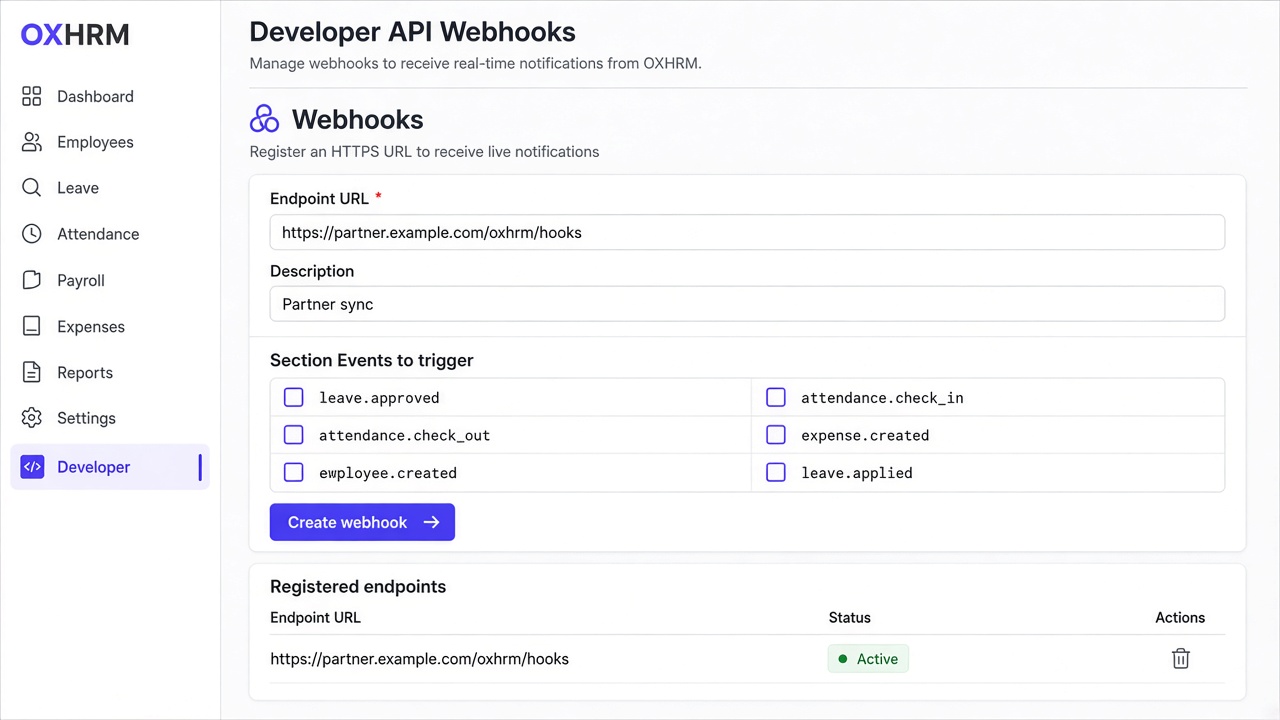
How to create a webhook in the panel
1. Sign in as org-admin and open Organization Settings → Developer API.
2. Scroll to the Webhooks section.
3. Enter your HTTPS endpoint URL (where OXHRM should POST events).
4. Optionally add a short description (for example “Partner sync”).
5. Tick the events you want to receive, then click Create webhook.
6. Copy the signing secret immediately — it is shown only once. Store it securely on your side.
What gets triggered
OXHRM sends an HTTPS POST to your URL when a selected event happens in that organization.
employee.created — a new employee is added
employee.updated — employee profile / master data changes
attendance.check_in — employee checks in
attendance.check_out — employee checks out
leave.applied — leave request submitted
leave.approved — leave request approved
leave.rejected — leave request rejected
expense.created — expense claim created
expense.approved — expense approved
expense.rejected — expense rejected
time_adjustment.created — attendance regularisation requested
time_adjustment.approved — time adjustment approved
Delivery details
Each delivery body looks like: { event, organizationId, data, createdAt }.
Requests include header X-OXHRM-Signature so you can verify the payload with the secret from step 6.
Prefer webhooks over polling for attendance, leave, and expense changes.
You can list or delete registered endpoints anytime from the same Webhooks section in Developer API.
Your webhook URL is your product’s HTTPS endpoint — not the OXHRM Integration API base URL and not the company panel URL.